

Key Takeaways
Our Verdict
No single connection type wins in every situation. Ethernet delivers the most stable experience for stationary setups, Wi-Fi offers flexibility around the home or office, and mobile data keeps you connected on the go. Knowing how each works lets you troubleshoot problems faster and pick the right option for the task at hand.
| Best for | Recommended |
|---|---|
| Reliable, high-speed connections at a fixed desk or workstation | Ethernet |
| Connecting multiple devices around the home without running cables | Wi-Fi |
| Staying connected while traveling or away from a router | Mobile Data |
What Actually Connects You to the Internet?
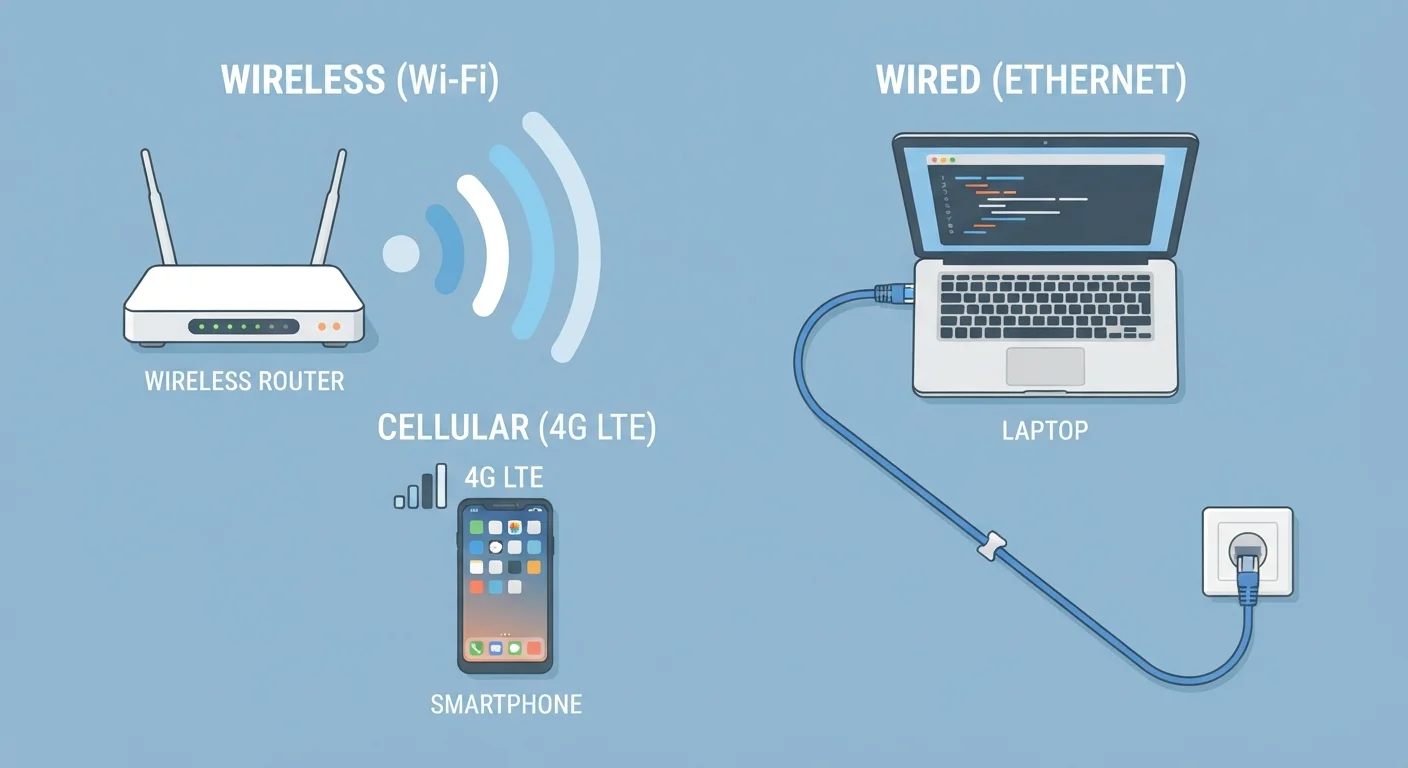
When you open a website or stream a video, your device is sending and receiving data through one of three main pathways: Wi-Fi, mobile data, or Ethernet. Each pathway uses a different physical or radio-based method to move information between your device and the broader internet.
If you've ever wondered why your video call drops in one room but not another, or why plugging in a cable suddenly speeds things up, the answer lies in understanding these three connection types. For a broader look at how the internet itself works, see our guide on the internet vs. the web.
Wi-Fi: Wireless and Convenient
Wi-Fi is a wireless technology that connects your device to a local router using radio waves. That router is itself connected to the internet through a wired line - typically from your internet service provider (ISP). Think of the router as a translator: it receives internet data through a cable and broadcasts it wirelessly to nearby devices.
Wi-Fi is the connection most people use at home, in coffee shops, and at libraries. Its main advantage is convenience - no cables required, and multiple devices can connect simultaneously. Its main limitation is range and interference. Walls, distance, and competing signals from neighboring networks can all weaken your Wi-Fi signal.
Choosing the Right Band on Your Router
If your router offers both 2.4 GHz and 5 GHz networks, try connecting close-range devices - like a laptop on your desk - to the 5 GHz band for faster speeds. Use 2.4 GHz for devices that are farther away or need to pass through walls. Many modern routers handle this automatically, but knowing the difference helps when you're troubleshooting a slow connection.
Wi-Fi signal strength is measured in frequency bands - commonly 2.4 GHz and 5 GHz. The 5 GHz band is faster but has shorter range; 2.4 GHz travels farther but is slower and more prone to interference from other devices like microwaves.
Mobile Data: Connection Anywhere With Signal
Mobile data (also called cellular data) works through a network of cell towers managed by your mobile carrier. When Wi-Fi isn't available, your smartphone or tablet can connect to the internet via these towers. You've likely seen signal indicators like 4G or 5G on your phone - these refer to the generation of cellular technology in use, with 5G being the newest and generally fastest.
The key advantage of mobile data is portability. You can browse the web, stream music, or use navigation apps while driving through areas that have no Wi-Fi at all. The trade-off is that mobile data is typically subject to a monthly data allowance (called a data cap), and speeds can vary based on how many people are using the same tower nearby.
5G
Latest mobile network generation
5G networks offer significantly higher theoretical speeds than 4G, though real-world performance depends on local infrastructure and coverage.
2.4 / 5 GHz
Common Wi-Fi frequency bands
Most modern routers broadcast on both bands, letting devices choose the one that best balances speed and range for their location.
Ethernet: Wired, Stable, and Fast
Ethernet uses a physical cable - called an Ethernet or RJ45 cable - to connect your device directly to a router or modem. Because the signal travels through a cable rather than through the air, it's far less susceptible to interference. This makes Ethernet the preferred choice for situations where consistency matters most, such as video editing, online gaming, or video conferencing from a fixed desk.
Not all devices have an Ethernet port - many slim laptops and tablets do not - but adapters are widely available. If your device supports it and you're working from a fixed location, a wired connection is usually worth the minor inconvenience of a cable.
For more terms like bandwidth, latency, and router that often come up in these conversations, our tech glossary for beginners breaks them down plainly.
Side-by-Side: How They Compare
Each connection type has its own strengths and trade-offs. The table below summarizes the key differences so you can quickly identify which suits your needs.
| Wi-Fi | Mobile Data | Ethernet | |
|---|---|---|---|
| Requires cables | No | No | Yes |
| Works away from home | Only near a router | Yes, anywhere with signal | No - fixed location only |
| Typical speed | Moderate to fast | Moderate (varies by coverage) | Fast and consistent |
| Signal reliability | Can drop with interference | Varies by location and tower load | Very stable |
| Data limits | Usually none at home | Monthly cap from carrier | None |
| Best suited for | Home/office multi-device use | On-the-go browsing | Fixed workstations, gaming, calls |
Once you understand your connection options, the next step is making sure your devices are configured safely. A pre-use setup checklist can help you start any new device on secure footing.